Most enterprise policy failures are not writing failures. The policy was drafted carefully, reviewed by legal, and approved by the right people.
The failure happened somewhere in the machinery between that approval and the moment an employee needed to act on what it said.
The machinery is a workflow. And in most organizations, the policy workflow is still largely manual: email threads chasing approvals, shared drives accumulating versions nobody is sure are current, reminder campaigns run from spreadsheets, and audit prep that involves three people reconstructing an evidence trail from calendar invites and inbox searches.
According to McKinsey research, enterprises that deploy workflow automation at scale reduce process operating costs by 40 to 75% and free up to 20% of employee time for higher-value work, but only when they deploy the right systems for their specific operational architecture.
The same principle applies to policy workflow: the gains are real, but they depend on automating the right stages, in the right order, with the right integration points.
This guide covers every stage of the enterprise policy workflow, what automation looks like at each stage, what the common implementation pitfalls are, and how to sequence a rollout that delivers compliance value quickly without creating new operational debt.
Understanding the Full Policy Workflow
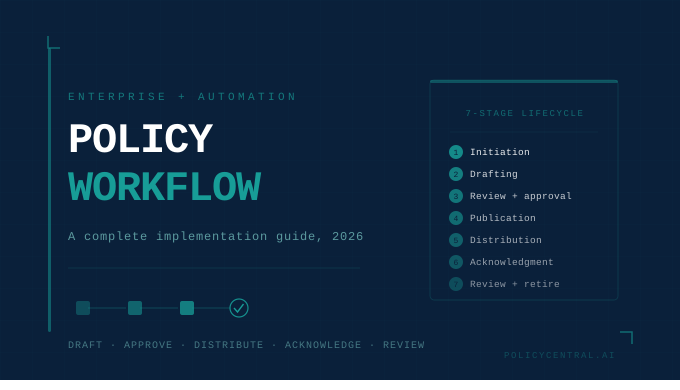
Before automating anything, it helps to map what you are actually automating. The policy lifecycle in an enterprise has seven distinct stages, each with its own workflow requirements and failure modes.
Stage 1: Initiation. A new policy need is identified, whether from a regulatory change, an audit finding, an incident, or a strategic decision. Without workflow, this stage is a conversation that may or may not result in a formal task being assigned to the right owner.
Stage 2: Drafting. A policy owner writes a first draft, typically in isolation, drawing on templates or previous versions without systematic AI assistance or structural guidance.
Stage 3: Review and approval. Subject matter experts, legal, compliance, and senior leadership review and approve the draft. Without automation, this is an email chain. With automation, it is a structured parallel or sequential workflow with role-based routing, version tracking, and deadline enforcement.
Stage 4: Publication. The approved policy is published to a central repository and made searchable. Without automation, publication is a manual upload. With automation, it triggers the distribution workflow.
Stage 5: Distribution and targeting. The policy is delivered to the right employee population. Without automation, this is a broadcast email. With automation, it is precision delivery based on HRMS-synced audience profiles, with tracked delivery confirmation.
Stage 6: Acknowledgment and engagement. Employees read, acknowledge, and ideally demonstrate comprehension of the policy. Without automation, acknowledgment is tracked in a spreadsheet. With automation, it is timestamped, version-specific, individually attributed, and linked to comprehension data.
Stage 7: Review, expiry, and retirement. Policies are reviewed on schedule, updated when regulations change, and retired when no longer relevant. Without automation, this stage is entirely reactive. With automation, review schedules are enforced, expiry alerts are triggered, and the full version history is maintained automatically.
The implementation challenge is not that any one of these stages is technically complex. It is that they are interdependent, and most organizations have automated some stages while leaving others entirely manual, creating handoff gaps where compliance risk concentrates. This is the difference between a document library and a genuine policy lifecycle management system.
Phase 1: Building the Authoring and Approval Workflow
The starting point for most implementations is the creation and approval workflow, because it is the foundation everything else depends on. A policy with a broken approval chain is not a policy in any legally defensible sense.
What Automation Looks Like Here
A well-automated authoring and approval workflow routes a draft policy to the configured reviewer set as soon as it is submitted, based on policy type, jurisdiction, and risk classification. Reviewers receive structured notifications with deadlines. Approvals and rejections are logged with timestamps and comments.
Version control is automatic: every edit creates a new version, previous versions are retained, and the system maintains a clear record of who changed what and when. The right workflows automate reviews and approval, streamline handoffs with automated reminders, and strengthen policy lifecycle management without adding administrative overhead.
The AI intelligence features that support this stage include AI-assisted drafting that suggests policy language based on regulatory requirements and existing document patterns, readability scoring that flags ambiguous clauses before they reach legal review, and automated FAQ generation that surfaces the questions employees are likely to ask before the policy is published.
Common Pitfalls at This Stage
The most common failure in approval workflow implementation is configuring the workflow before mapping the actual approval logic. Organizations implement a sequential approval chain only to discover that legal and compliance reviews need to happen in parallel, not in sequence, doubling the cycle time. Map your real approval dependencies before you configure any routing.
A second pitfall is over-engineering the first workflow. Start with the highest-volume policy type in your organization, achieve a clean automated cycle for that type, measure the improvement, and then extend the pattern. Organizations that try to automate all policy types simultaneously typically end up with a patchwork of workflows that nobody maintains consistently.
Phase 2: Automating Distribution and Targeting
Once a policy is approved and published, the next workflow layer determines whether it actually reaches the people it governs.
Policies, simplified with AI-powered automation
Book a 20-minute demo to see how PolicyCentral.ai streamlines policy creation, distribution, and compliance across your enterprise.
Book a DemoWhat Automation Looks Like Here
Automated workflows and version control reduce delays, track updates, and prevent compliance risks. Embedding policies into daily tools with attestation tracking ensures engagement and measurable compliance.
The distribution and targeting workflow that delivers real compliance value is one that is synchronized with your HRMS and Active Directory. Rather than a manually maintained distribution list that drifts from the moment it is created, the system queries the live employee directory and delivers the policy to every current employee matching the configured target criteria: department, location, grade, role, employment type.
Evergreen distribution extends this to new joiners. Configure a policy’s target profile once, and every employee who joins and matches that profile receives the policy automatically, without any manual trigger. This single feature closes the onboarding compliance gap that causes organizations to discover coverage failures during audits rather than before them.
Mail-merge-style targeting goes further, allowing different content variants to be embedded within the same policy send based on recipient attributes. A code of conduct that contains location-specific clauses can be sent once with dynamic content that automatically presents the relevant version to each recipient.
Common Pitfalls at This Stage
The most common distribution failure is treating all policy updates as equivalent. A minor formatting correction to an existing policy does not require the same distribution workflow as a substantive regulatory update that changes employee obligations. Configuring materiality thresholds so that only substantive changes trigger a full distribution and acknowledgment cycle prevents the acknowledgment fatigue that trains employees to click through without reading.
A second pitfall is not accounting for employees who are on leave, in different time zones, or in roles with limited system access during a distribution window. An effective distribution workflow includes automatic re-triggering for employees who were absent when the original delivery occurred, with a configurable acknowledgment deadline that starts from the date of delivery, not the date of publication.
Phase 3: Automating Acknowledgment and Comprehension Tracking
This is the stage where most organizations think they have more automation than they actually do.
What Automation Looks Like Here
A genuine acknowledgment workflow captures the full chain from delivery through understanding. The employee interaction features that support this chain include e-signatures that are legally attributable to a specific individual verified through SSO, inline comment and response capabilities that allow employees to flag confusion or ask questions at the point of reading, AI-generated comprehension quizzes that verify understanding rather than just receipt, and automated escalation workflows that route non-responders to manager notification after a configurable deadline.
Organizations that communicate policies transparently report 34% fewer employee complaints about policy-related issues compared to those that distribute policies without context.
The comprehension layer is where the greatest compliance value is created and the most consistently missed. An acknowledgment record that includes a passed quiz score, a time-spent-reading metric above a reasonable threshold, and a specific version reference is substantially more defensible in a regulatory examination than a bulk timestamp produced by a broadcast email campaign. The full picture of what regulators now expect from these records is covered in our guide to policy acknowledgment tracking and legal requirements by industry.
The chatbot engagement layer adds a further dimension. Every employee question submitted through a PolicyGPT-style interface is a logged interaction showing that the employee was actively trying to understand and apply the policy correctly. That interaction log is compliance evidence of a quality that acknowledgment timestamps alone cannot produce.
Common Pitfalls at This Stage
The comprehension threshold needs to be calibrated carefully. Setting quiz pass rates too high for operational policies that employees need to implement quickly creates friction that reduces engagement overall. Setting them too low undermines the value of the comprehension record in an audit. A good default is an 80% pass threshold with one automatic retry permitted before the workflow escalates to manager notification.
A second pitfall is not building non-acknowledgment escalation into the workflow from the start. Without a configured escalation path, non-responders accumulate silently until someone manually pulls a compliance report. An automated workflow that routes overdue acknowledgments to a line manager after 14 days and to the compliance team after 21 days ensures the gap closes before it becomes an audit finding.
Phase 4: Review Cycles, Expiry Management, and Retirement
Policy decay is one of the least discussed compliance risks in enterprise organizations. A policy that was accurate when published in 2023 and has not been reviewed since is a liability in 2026, particularly if the regulatory framework it governs has changed.
Policies should be regularly updated, either on an annual basis or in response to recent updates in laws or regulations, ensuring that policies remain current and effective.
What Automation Looks Like Here
An automated review cycle workflow triggers a review task to the designated policy owner a configurable number of days before the policy’s review date. The owner receives a structured prompt: review the policy against the current regulatory requirements, confirm that the content is still accurate, update if necessary, and route the updated version through the standard approval workflow if substantive changes are made.
The tracking and reporting layer surfaces the full picture: policies approaching review dates, policies that are overdue for review, policies where the last reviewer is no longer in the organization, and policies where regulatory changes have occurred in the governing framework since the last review. That last capability, regulatory change alerting mapped to specific internal policies, is what separates a policy intelligence platform from a policy storage system.
For retirement, the workflow should automatically archive the policy, retain the full version history and all associated acknowledgment records for the applicable retention period, notify affected employees that the policy has been retired, and if a replacement policy exists, trigger the distribution workflow for the replacement.
Common Pitfalls at This Stage
The most common failure in review cycle management is setting review periods by policy type rather than by regulatory risk. A standard HR policy might reasonably have a two-year review cycle. A data security policy in an organization subject to active regulatory scrutiny should be reviewed annually at minimum, with triggered reviews whenever the governing framework changes. Configure review cycles by risk tier, not by document category.
A second pitfall is treating policy retirement as an administrative task rather than a compliance workflow. A retired policy that employees can still find and act on in an outdated repository is a compliance failure. Retirement needs to be accompanied by access revocation, replacement notification, and acknowledgment record preservation, all automated.
Integration Architecture: Connecting the Policy Workflow to Enterprise Systems
An automated policy workflow that operates in isolation from the organization’s other enterprise systems creates integration gaps that become compliance risks. The three integration points that matter most are these.
HRMS integration. Confirm SSO and SCIM support, APIs or native connectors to HR, LMS, ticketing, and your GRC or IRM tools so distribution and attestations can be automated. Without live HRMS sync, every distribution list drifts from reality. With it, the policy workflow always reflects the current workforce, including new joiners, transfers, and exits.
SSO and identity management. Single sign-on is not optional for enterprise policy workflow automation. Without it, authentication friction is the largest driver of acknowledgment procrastination. With it, the barrier to completing an acknowledgment drops to near zero, and the identity chain from employee authentication through acknowledgment record is unbroken.
GRC and compliance platform integration. Policy acknowledgment data should flow into your broader compliance evidence picture automatically. An API integration between your policy platform and your GRC tool means that when an auditor asks for proof of workforce-wide policy compliance, the policy platform and the GRC dashboard tell the same story, sourced from the same underlying data.
The enterprise features that make this integration architecture possible include full REST API access, Active Directory and HRMS sync, multi-department architecture for organizations where different business units need separate policy governance, and white-label mobile deployment that makes the policy access layer feel like a native part of the enterprise technology stack.
Security and Audit Trail Requirements for Automated Policy Workflows
Every action in an automated policy workflow is a potential piece of evidence. The architecture of the workflow system determines whether that evidence is credible.
Essential features include encrypted data storage, rigorous access control, and connectors or APIs to HR systems, CRMs, cloud platforms, or ERPs to collect required compliance inputs.
The security and compliance requirements for enterprise policy workflow infrastructure are: AES-256 encryption for all data at rest and in transit; immutable audit logs that record every action on every policy document with timestamps that cannot be modified after the fact; role-based access controls that limit who can create, approve, publish, distribute, and view policies based on defined organizational roles; IP restriction capabilities for organizations with strict data access requirements; and VAPT-tested architecture that can demonstrate its security posture to a regulator on request.
These requirements are not aspirational. For BFSI organizations subject to RBI, IRDAI, or SEBI examination, and for any organization subject to GDPR, HIPAA, or SOX, the security architecture of the workflow system is examined with the same scrutiny as the policies it manages. A workflow system that cannot produce a complete, immutable record of every approval, distribution, and acknowledgment event across its full history is not fit for purpose in a regulated enterprise environment.
Implementation Sequencing: A Practical Rollout Plan
Given the interdependencies between workflow stages, sequencing matters. Here is a phased approach that delivers compliance value quickly while building toward a complete automation architecture.
Weeks 1 to 4: Baseline and configuration. Audit your current policy library. Identify the 20 highest-risk policies by regulatory exposure, employee impact, and review frequency. Map the actual approval logic for those policies, including parallel versus sequential dependencies. Configure the authoring and approval workflow for those 20 policies only.
Weeks 5 to 8: Distribution and acknowledgment. Integrate with HRMS and Active Directory. Configure targeting profiles for the 20 priority policies. Deploy the acknowledgment workflow with e-signature, comprehension quiz, and escalation path. Run the first automated distribution cycle and measure acknowledgment rates against your pre-automation baseline.
Weeks 9 to 12: Coverage expansion and chatbot deployment. Extend the workflow configuration to the full policy library. Deploy the conversational AI layer for employee policy queries. Configure review cycle automation and expiry alerting for all policies.
Month 4 onward: Reporting, integration, and optimization. Build the GRC integration to flow acknowledgment data into your compliance evidence picture. Activate search analytics reporting to identify policy coverage gaps. Run the first quarterly compliance dashboard review using automated data.
Best practices for enterprise workflow automation include: document the workflow completely before selecting any tool, design exception handling and escalation paths for every automated decision point before launch, implement role-based access controls and complete audit logging from the first deployment, and establish baseline performance metrics before go-live to track ROI at 30, 60, and 90-day intervals.
Measuring Implementation Success
Businesses measure workflow automation success through quantitative metrics, including cycle time reduction, error rate decreases, processing volume increases, and cost savings, and qualitative indicators such as employee satisfaction improvements, compliance enhancement, and innovation capacity.
For policy workflow automation specifically, the metrics that matter are these.
Approval cycle time. The number of days from draft submission to publication. A well-automated workflow should reduce this by 50 to 60% within the first two cycles. Manual approval chains typically take 10 to 15 business days for a standard policy update. Automated workflows with parallel routing and deadline enforcement typically achieve this in 4 to 6 days.
Acknowledgment completion rate and time. The percentage of targeted employees who complete acknowledgment within the configured deadline, and the median time from delivery to completion. A well-designed workflow with SSO integration and mobile access should achieve 85 to 95% completion within the acknowledgment window, compared to 40 to 60% typical of email-based campaigns.
Comprehension rate. The percentage of employees who pass comprehension quizzes on the first attempt. A low first-attempt pass rate on a high-risk policy is an early warning signal that the policy needs clearer language, not more reminders.
Policy currency rate. The percentage of active policies that are within their review cycle and not overdue. Most organizations that implement automated review tracking discover that 20 to 40% of their policy library is past its review date. Bringing this to near zero is itself a material compliance improvement.
Audit preparation time. The number of hours required to prepare a complete evidence package for a compliance audit. Organizations with fully automated policy workflows and GRC integration typically reduce this from several weeks to two to three days.
If you want to see how PolicyCentral.ai automates the full policy workflow, from AI-assisted authoring and role-based approval through HRMS-synced distribution, comprehension tracking, and audit-ready reporting, request a demo today.
Frequently Asked Questions
What is enterprise policy workflow automation?
It is the systematic replacement of manual steps in the policy lifecycle, including approval routing, distribution, acknowledgment collection, review scheduling, and evidence assembly, with software-driven processes that execute, route, monitor, and report automatically based on configured rules and integrations.
Where should an organization start with policy workflow automation?
Start with the approval workflow for your highest-risk policies. Map the actual approval logic before configuring any tool, achieve a clean automated cycle for a defined policy set, measure the improvement, then extend. Organizations that try to automate everything simultaneously typically achieve partial automation everywhere and complete automation nowhere.
How long does a full enterprise policy workflow automation implementation take?
For a phased implementation covering the full lifecycle of a large enterprise policy library, 90 to 120 days to core automation and six months to full optimization is a realistic timeline. The first measurable compliance improvement, approval cycle time reduction and acknowledgment rate increase, typically appears within 30 to 45 days of the first distribution cycle going live.
Does policy workflow automation require replacing existing HR or GRC systems?
No. The most effective implementations integrate with existing HRMS, Active Directory, and GRC platforms via API and native connectors. The policy platform sits in the middle of this ecosystem, drawing employee data from HR systems and pushing acknowledgment data to compliance systems, rather than replacing either.
How does workflow automation affect the audit evidence collection process?
Significantly. Organizations with fully automated policy workflows and GRC integration typically reduce audit preparation time from several weeks to two to three days. The evidence exists continuously and in a structured format, rather than being assembled manually from multiple systems before each audit.
What happens to employees who do not acknowledge a policy within the deadline?
An effective automation workflow handles this in stages: automated reminder to the employee at a configurable interval before the deadline, manager notification when the deadline passes without acknowledgment, and compliance team escalation if still outstanding after a second deadline. Every escalation event is logged. The compliance team always has a real-time view of who is overdue and by how much.
Can policy workflow automation handle multilingual organizations?
Yes, provided the platform supports multi-language policy storage and distribution. The targeting layer can route language-specific policy versions to employees based on location or language preference attributes in the HRMS, with acknowledgment records tied to the specific language version the employee received.