Most organizations do not decide to manage policies in SharePoint. They drift into it. SharePoint is already in the Microsoft 365 stack, it stores documents, and it has folders and permissions, so it becomes the default home for policy files almost by accident.
For a while it works. A document library with version history is a real improvement over a shared drive full of files named final-v3-USE-THIS. But policy management is not document storage, and the gap between the two is where compliance risk accumulates. According to Hyperproof’s 2025 benchmark, 52% of compliance professionals still spend 30 to 50% of their time on manual administrative tasks, and a repository that cannot automate distribution, acknowledgment, and review is a large part of the reason.
This is an honest look at what SharePoint does well for policies, where it falls short, and how to tell when your organization has outgrown it.
What SharePoint does well
Credit where it is due. SharePoint is a capable document management system. It stores files centrally, keeps version history, supports metadata and search, and inherits the access controls and single sign-on of your Microsoft 365 tenancy. For an organization with a small number of policies and a workforce that is comfortable navigating SharePoint, it can be enough.
The trouble begins when you ask SharePoint to do the things a policy management system exists to do, rather than the things a document library exists to do.
Where SharePoint falls short for policy management
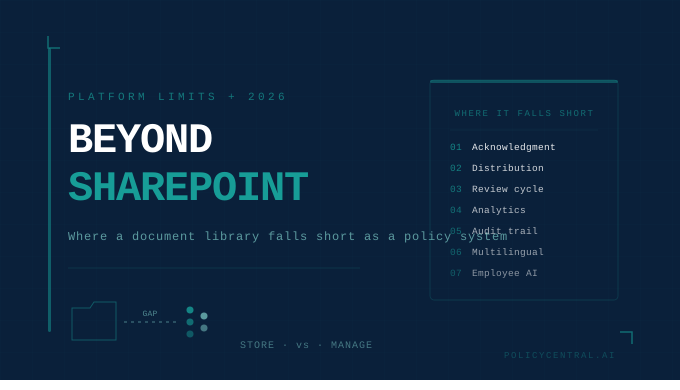
Acknowledgment tracking is manual or bolted on. A policy is only a control if you can prove the right people read and accepted it. Native SharePoint has no real acknowledgment workflow. Teams end up building one from lists, Power Automate flows, and spreadsheets, or chasing sign-offs by email. The result is fragile, hard to audit, and exactly the manual burden the platform was supposed to remove.
There is no targeted distribution. A document library is passive. It waits for people to come to it. A policy management system pushes the right policy to the right audience and confirms receipt. SharePoint cannot target a policy to, say, field staff in three states on a specific grade, and it has no live link to your HRMS, so it cannot tell when someone joins, leaves, or changes role. Distribution lists built by hand drift out of date the moment the org chart moves.
Version control exists, but review does not. SharePoint tracks versions of a file. It does not enforce a review cycle, remind an owner that a policy is due, or route a revision through approval and then re-acknowledgment. Version history answers what changed. It does not answer whether the change was reviewed, approved, and re-acknowledged by the affected workforce, which is what an auditor asks. Our guide to policy version control covers why that distinction carries legal weight.
Analytics stop at access logs. SharePoint can tell you a file was opened. It cannot tell you which policies have high acknowledgment but low read-time, which departments lag across policy types, or which searches never led to a document being found. That behavioral signal is the difference between knowing your compliance posture and hoping it is fine.
Audit trails are not built for regulators. The records a regulated institution needs are immutable and tamper-evident, capturing who created, approved, distributed, and acknowledged each policy, with timestamps that cannot be edited after the fact. A general-purpose document library was not designed to that standard, and in a regulatory examination that gap is expensive.
No multilingual delivery and no employee assistant. SharePoint will not deliver a policy in Hindi or Tamil to the employees who read those languages, and it cannot answer an employee’s plain-language question with a cited response from your own policy. In 2026, both of those have moved from nice-to-have to expected.
The add-on trap
The common response to these gaps is to layer tools on top: a Power Automate flow for reminders, a Forms-based quiz for comprehension, a third-party add-on for attestation. Each patch solves one problem and adds another integration to maintain.
Policies, simplified with AI-powered automation
Book a 20-minute demo to see how PolicyCentral.ai streamlines policy creation, distribution, and compliance across your enterprise.
Book a DemoOver time you assemble a policy management system out of parts, held together by the person who built the flows, and it breaks the moment that person leaves or Microsoft changes an API. You have taken on the cost and fragility of a bespoke system without the coherence, support, or audit-readiness of a purpose-built one. The hidden costs of stitching policy management together from general-purpose tools mirror the ones we documented for managing HR policies on shared drives.
When SharePoint is enough, and when to switch
SharePoint may be enough if you have a small, stable policy library, a workforce that lives in Microsoft 365, no meaningful multilingual requirement, and a light regulatory burden. If a manual acknowledgment chase once a year is tolerable, there is no urgent reason to move.
You have outgrown it when any of the following is true: you operate under RBI, SEBI, IRDAI, or DPDP obligations that expect provable, workforce-wide policy engagement; your workforce reads multiple languages; your acknowledgment process depends on spreadsheets and reminder emails; or you cannot produce, on demand, a clean audit report showing who acknowledged which version of a policy and when. At that point the manual overhead and the audit risk both exceed the cost of a dedicated platform.
What a dedicated platform changes
A purpose-built policy management platform treats distribution, acknowledgment, review, and audit as first-class functions rather than features you assemble yourself. It targets policies by department, location, grade, and role, syncs live with your HRMS so lists never drift, captures defensible acknowledgment records, and produces an audit report as a live dashboard rather than a three-week evidence project. Getting that automation right is the subject of our enterprise policy workflow automation guide.
Crucially, a platform-agnostic system does not require you to leave Microsoft 365. It sits alongside it, integrating with your identity and directory, while removing the dependency on SharePoint being bent into a role it was never designed for. For a direct sense of how a dedicated platform compares to the tools organizations often start with, our feature comparison lays the options side by side.
PolicyCentral.ai was built for exactly this transition: multilingual delivery across ten Indian languages, precision distribution with HRMS sync, tamper-evident audit trails, and a Gen AI assistant that answers employee questions from your own published policies. If your policy program has outgrown SharePoint, request a demo and we will show you the migration path.
Frequently Asked Questions
Can you use SharePoint for policy management?
Yes, for basic needs. SharePoint is a capable document library with version history, search, and Microsoft 365 access controls, and it works for a small, stable set of policies. It falls short when you need automated targeted distribution, provable acknowledgment, enforced review cycles, engagement analytics, multilingual delivery, or regulator-grade audit trails.
What is the main limitation of SharePoint for policies?
It is a passive document store. It holds files well but does not push the right policy to the right audience, confirm that they read and understood it, enforce a review cycle, or produce a tamper-evident audit record. Those functions have to be built with add-ons or done manually, which reintroduces the administrative burden a policy system is meant to remove.
Is it worth building policy workflows on SharePoint with Power Automate?
It can work for simple cases, but it tends to become fragile. Each flow, form, and add-on solves one gap and adds an integration to maintain, and the assembled system usually depends on the individual who built it. For regulated organizations the maintenance cost and audit risk typically outweigh the savings compared to a purpose-built platform.
When should an organization move off SharePoint for policy management?
When you operate under regulatory frameworks that expect provable workforce-wide engagement, when your workforce reads multiple languages, when acknowledgment depends on spreadsheets and reminder emails, or when you cannot produce a clean audit report on demand showing who acknowledged which policy version and when.
Do you have to leave Microsoft 365 to adopt a dedicated policy platform?
No. A platform-agnostic policy management system sits alongside Microsoft 365, integrating with your identity and directory, rather than replacing it. You keep the productivity stack your organization already uses while moving policy distribution, acknowledgment, and audit onto a system designed for them.